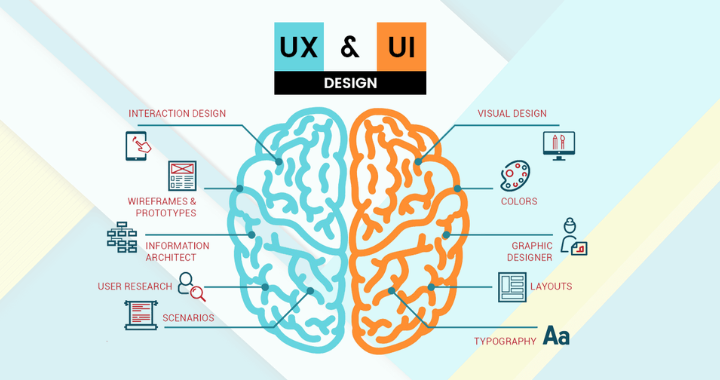
User experience (UX) and user interface (UI) design are now essential to the success of any application, website, or digital product in today’s digitally first world.Whether it’s a mobile app, an e-commerce site, or a software dashboard, how users interact with the interface and how they feel while doing it can make or break a product.
While UI and UX are often lumped together, they serve different but complementary roles in product design.
Key Definitions:
- An application’s visual layout is known as its user interface (UI). This covers responsive design, buttons, icons, fonts, colour palettes, and spacing.
- User Experience (UX): The overall experience a user has while interacting with a product, focusing on usability, functionality, and satisfaction.
Core Responsibilities of a UI/UX Designer
A UI/UX designer wears multiple hats and collaborates with developers, project managers, and stakeholders.
Main Responsibilities:
- Conducting user research and analyzing user needs
- Creating wireframes and prototypes
- Designing user flows and site maps
- Developing high-fidelity mockups
- Conducting usability testing
- Ensuring responsiveness and accessibility
- Collaborating with developers to ensure design implementation
- Iterating designs based on feedback
The Difference Between UI and UX Design
Though related, UI and UX focus on different aspects of design.
UX Design:
- Empathy-driven
- Research-focused
- Concerned with usability and functionality
- Covers the end-to-end journey of the user
UI Design:
- Visual and interactive
- Aesthetic-driven
- Concerned with the look and feel
- Focuses on design systems and consistency
- In short, UX is how it works; UI is how it looks.

UI/UX Design Process
Designing a user-friendly and visually appealing product follows a structured process:
Research
- User interviews
- Competitor analysis
- Surveys & questionnaires
- Personas creation
Define
- Define user problems and goals
- Create user journeys and empathy maps
Design
- Low-fidelity wireframes
- Interactive prototypes
- UI style guides
Test
- Usability testing (remote or in-person)
- A/B testing
- Feedback collection
Implement
- Developer handoff
- Collaborating to refine implementation
Iterate
- Post-launch data analysis
- Continuous improvements based on user feedback

Essential Principles of UI/UX Design
User-Centric Design
Design should always prioritize user needs over aesthetics or technical capabilities.
Consistency
Keep all platforms’ designs consistent to increase familiarity.
Accessibility
Ensure that the design works for all users, including those with disabilities.
Hierarchy
Visual and content hierarchy guides users’ attention and actions.
Feedback
Every user interaction should have appropriate feedback (e.g., clicking a button should give a visual response).
Simplicity
Remove unnecessary elements to reduce cognitive load.

UI/UX Tools of the Trade
Modern UI/UX designers rely on a suite of digital tools to bring ideas to life.
Design & Prototyping:
- Figma
- Adobe XD
- Sketch
- InVision
User Research & Testing:
- Maze
- Hotjar
- UsabilityHub
- Lookback
Collaboration & Handoff:
- Zeplin
- Abstract
- Notion
- Miro

UI/UX Design Deliverables
Depending on the project stage, UI/UX designers produce various deliverables:
- User personas
- Journey maps
- Wireframes
- High-fidelity mockups
- Clickable prototypes
- Design systems
- Accessibility reports
Top Skills Required for UI/UX Designers
Hard Skills:
- Prototyping
- Interaction design
- Information architecture
- Visual design
- Responsive design
- Frontend basics (HTML/CSS knowledge is a plus)
Soft Skills:
- Empathy
- Communication
- Problem-solving
- Critical thinking
- Collaboration
Trends in UI/UX Design
The field is always evolving. Some current trends include:
- Dark mode design
- Micro-interactions
- Voice user interfaces (VUI)
- AI-powered personalization
- Neumorphism and glassmorphism
- Augmented Reality (AR) integration
- Design systems and component libraries
UI/UX in Different Industries
UI/UX isn’t limited to tech startups. Designers are needed across:
- Healthcare (apps for patients and providers)
- Finance (banking interfaces)
- Education (e-learning platforms)
- E-commerce (online stores)
- Government (public service portals)
Career Path of a UI/UX Designer
There are multiple paths and specializations within the UI/UX domain:
Entry-Level Roles:
- Junior UX Designer
- UI Designer
- UX Researcher
- Interaction Designer
Mid-Level Roles:
- Product Designer
- UX Strategist
- UX Writer
Senior-Level Roles:
- Lead UX Designer
- Design Manager
- Creative Director
- Head of Design
Emotional Design in UI/UX
- Designing with emotion in mind enables users to engage with your product more deeply.
- Using micro-animations, emojis, and subtle sound feedback can create delight.
- Color psychology plays a big role in emotional design — warm colors evoke energy; cool tones promote trust.
- Thoughtful error messages reduce frustration and build empathy with users.
Mobile-First and Responsive Mindset
- Make your design simpler and clearer by starting with smaller screens.
- Use adaptive components that shift based on screen size.
- Prioritize thumb-friendly elements in mobile UI.
- Responsive typography ensures readability across devices.
Design Thinking in UX
- Empathize → Define → Ideate → Prototype → Test: this 5-step method ensures user-centric solutions.
- Continuous iteration is emphasised in design thinking, which is not linear.
- Cross-functional collaboration is key to better ideas and fewer revisions.
Behavioral Psychology in UX
- GamificaHick’s Law: the more options a user has, the longer they’ll take to decide.
- According to Fitts’ Law, commonly used features should be positioned near the user’s natural hand movement, particularly on mobile devices.
- The Zeigarnik Effect: users remember incomplete tasks — progress bars and checklists leverage this to encourage action.tion in UI/UX
Gamification in UI/UX
- Adding progress trackers, badges, and rewards boosts engagement.
- Leaderboards and milestones can turn mundane tasks into motivating challenges.
- Even small elements like a congratulatory animation can greatly enhance UX.
Dark Mode UX Tips
- Avoid pure black; use dark gray for better contrast and eye comfort.
- Accent colours should be used sparingly for hierarchy and clarity.
- Test for readability in both light and dark modes.
Accessibility = Inclusivity
- Add alt text for all images and interactive graphics.
- Ensure keyboard navigability — especially for forms and modals.
Those with visual impairments benefit from high contrast ratios. - Use ARIA labels and roles for screen reader compatibility.
Design Systems and Consistency
- A design system streamlines scalability and brand consistency.
- Components like buttons, modals, and form fields should be reusable and documented.
- Tools like Figma, Storybook, and Zeroheight help maintain systems.
Conclusion
UI/UX design is a powerful blend of art and science. It involves creativity, empathy, research, and technology—all aimed at creating products that not only look good but feel intuitive and enjoyable. As digital experiences continue to expand into new domains, the need for skilled UI/UX designers is growing exponentially.
Whether you’re an aspiring designer or a product leader looking to understand design better, knowing the value of good UI/UX is crucial to building impactful digital experiences.Putting users first at every stage is what it means to invest in UI/UX design. It’s not only about looks; it’s also about empathy, usability, and smooth communication. Good user interface/user experience (UI/UX) can make the difference between retaining and losing users in a cutthroat digital world.